
AI 虚拟人 MCP Server
让 AI 编程助手读懂 A2E 的虚拟人生成 API,在 IDE 里直接生成可运行的代码。
它解决什么问题
A2E 是 AI 驱动虚拟人生成领域的先行者。全新的 Model Context Protocol(MCP)Server 将改变开发者工具的使用方式,让 AI 编程助手通过深入理解 API,自动生成复杂 AI 虚拟人系统代码。
我们的 AI 虚拟人 MCP Server 由 apidog 提供支持,在以下三者之间建立动态桥梁:
- AI 编程工具 (由大语言模型驱动的 IDE)
- A2E 虚拟人生成 API 生态
- 项目自身的实现需求
这条智能通道让自动化代码生成既能利用平台能力,也能遵循项目约束。

准备条件
Node.js 18 或更高版本,建议使用最新 LTS 版本。同时需要一个支持 MCP 的 IDE, 例如 Cursor,或 VS Code 搭配 Cline 插件。
接入你的 AI 助手
启动命令四个客户端通用 —— npx -y apidog-mcp-server@latest --site-id=746061,
差别只在配置文件的格式与位置。挑你在用的那个:
Claude Code
一条命令即可,不必手写配置文件:
claude mcp add --scope user "A2E - API Specification" \
  -- npx -y apidog-mcp-server@latest --site-id=746061
也可以直接写进 ~/.claude.json 的 mcpServers 段,格式与下面 Cursor 那份相同。
Codex
写进 ~/.codex/config.toml,注意它用的是 TOML 不是 JSON:
[mcp_servers."A2E - API Specification"]
command = "npx"
args = ["-y", "apidog-mcp-server@latest", "--site-id=746061"]
Cursor / VS Code + Cline
复制下面的 JSON,添加到 IDE 的 MCP 配置文件中:
{
  "mcpServers": {
    "A2E - API Specification": {
      "command": "npx",
      "args": [
        "-y",
        "apidog-mcp-server@latest",
        "--site-id=746061"
      ]
    }
  }
}
如果你使用的是 Windows,且上面的配置无法生效,改用下面这份:
{
  "mcpServers": {
    "A2E - API Specification": {
      "command": "cmd",
      "args": [
        "/c",
        "npx",
        "-y",
        "apidog-mcp-server@latest",
        "--site-id=746061"
      ]
    }
  }
}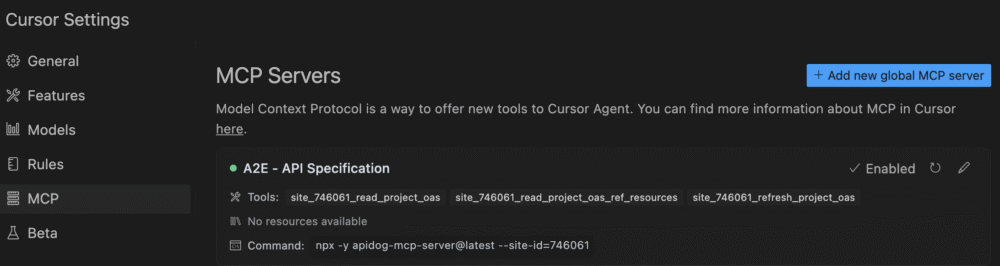
接入后这个 server 会提供三个工具:read_project_oas、
read_project_oas_ref_resources、refresh_project_oas。
它们的作用是让 AI 读到 A2E 的 OpenAPI 规范,据此写出正确的调用代码
—— 生成视频这类动作仍由你运行代码完成,不是助手直接替你执行。
在 Cursor 里试一次
按上一节启用 A2E MCP Server 之后,新建一个空的 Python 文件,向 Cursor 发送请求: 「编写一段示例代码,列出 A2E 的所有虚拟人,并生成一个随机公众人物的视频」。 下面是 AI 在 5 秒内写出的代码:
import os
import random
import requests

def list_a2e_avatars():
    """
    Function to list all available avatars from A2E API
    Returns a list of avatar information
    """
    try:
        # Make API request to get avatars
        response = requests.get("https://video.a2e.ai/devv1/avatars")
        response.raise_for_status()

        # Parse JSON response
        avatars = response.json()

        print(f"Found {len(avatars)} avatars:")
        for i, avatar in enumerate(avatars):
            print(f"{i+1}. {avatar['name']} (ID: {avatar['id']})")

        return avatars
    except Exception as e:
        print(f"Error fetching avatars: {str(e)}")
        return []

def generate_public_figure_video(prompt=None, output_path="./generated_video.mp4"):
    """
    Generate a video of a random public figure using A2E API

    Args:
        prompt (str, optional): Custom prompt. If None, a default will be used
        output_path (str): Path to save the generated video

    Returns:
        str: Path to the generated video file
    """
    # List of public figures to choose from
    public_figures = [
        "Elon Musk", "Barack Obama", "Taylor Swift", "Leonardo DiCaprio",
        "Oprah Winfrey", "Bill Gates", "Beyoncé", "Tom Hanks"
    ]

    # Select a random public figure
    figure = random.choice(public_figures)

    # Default prompt if none provided
    if prompt is None:
        prompt = f"{figure} giving a short speech about artificial intelligence"

    print(f"Generating video for: {prompt}")

    try:
        # Get available avatars
        avatars = list_a2e_avatars()
        if not avatars:
            raise Exception("No avatars available")

        # Select a random avatar
        avatar = random.choice(avatars)
        avatar_id = avatar['id']

        print(f"Using avatar: {avatar['name']} (ID: {avatar_id})")

        # API request to generate video
        api_key = os.environ.get("A2E_API_KEY")
        if not api_key:
            raise Exception("A2E_API_KEY environment variable not set")

        headers = {
            "Authorization": f"Bearer {api_key}",
            "Content-Type": "application/json"
        }

        payload = {
            "avatar_id": avatar_id,
            "prompt": prompt,
            "settings": {
                "quality": "high",
                "duration": 15  # seconds
            }
        }

        # Make API request
        response = requests.post(
            "https://video.a2e.ai/devv1/generate",
            headers=headers,
            json=payload
        )
        response.raise_for_status()

        # Get generation ID from response
        generation_id = response.json().get("generation_id")
        if not generation_id:
            raise Exception("No generation ID returned")

        print(f"Generation started with ID: {generation_id}")

        # Poll for completion
        status = "pending"
        while status in ["pending", "processing"]:
            status_response = requests.get(
                f"https://video.a2e.ai/devv1/generations/{generation_id}",
                headers=headers
            )
            status_response.raise_for_status()

            status_data = status_response.json()
            status = status_data.get("status")

            print(f"Generation status: {status}")

            if status == "completed":
                video_url = status_data.get("video_url")
                if not video_url:
                    raise Exception("No video URL in completed response")

                # Download the video
                video_response = requests.get(video_url)
                video_response.raise_for_status()

                with open(output_path, "wb") as f:
                    f.write(video_response.content)

                print(f"视频 saved to: {output_path}")
                return output_path

            elif status == "failed":
                raise Exception(f"Generation failed: {status_data.get('error')}")

            # Wait before polling again
            import time
            time.sleep(5)

    except Exception as e:
        print(f"Error generating video: {str(e)}")
        return None

# Example usage
if __name__ == "__main__":
    # List all available avatars
    avatars = list_a2e_avatars()

    # Generate a video with a random public figure
    video_path = generate_public_figure_video(
        prompt="A public figure discussing the future of AI technology",
        output_path="./public_figure_video.mp4"
    )

    if video_path:
        print(f"Successfully generated video at: {video_path}")
    else:
        print("Failed to generate video")